How to Use 3D LUT on Mobile & Import .cube LUT on Phone
In professional photography and filmmaking, a LUT (Look-Up Table) is the ultimate secret tool to instantly transform raw photos or video footage into stunning cinematic colour grades. Previously, using .cube LUT files was mostly restricted to desktop computers using heavy software like DaVinci Resolve or Adobe Premiere.
However, with recent advances in mobile processing power, you can now easily use 3D LUT on mobile devices. In this guide, we will walk you through how to use LUT file on phone (both iOS and Android) using Modipix – a professional offline photo editor featuring advanced film simulation.
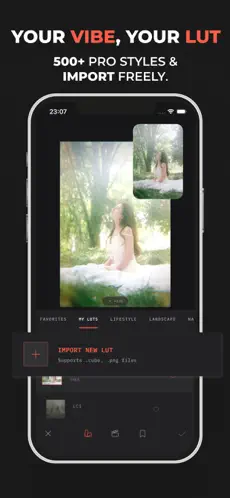 Professional interface for importing .cube LUT files on mobile devices
1. What is a 3D LUT File? Why Import LUTs to Your Phone?
A LUT acts as a colour mapping directory, replacing original pixel values with pre-calculated colour grades. Unlike basic social media filters, professional .cube or .png 3D LUTs offer:
- High-Precision Colour Mapping: Colours are remapped precisely per pixel to preserve image details.
- Smooth Gradients: Avoids banding or digital colour noise in shadow areas.
- Unlimited Creative Freedom: Import any vintage or cinematic LUT from your PC and use it on the go.
To process these files, you need a mobile application designed with a robust 3D LUT rendering engine, like Modipix.
2. Step-by-Step Guide to Importing and Using LUTs on Mobile with Modipix
To begin using professional colour LUTs and import .cube LUT on phone, download Modipix and follow these 5 easy steps:
Step 1: Open the LUT & Film Emulation tool
Import your photo into the Modipix editor. On the bottom toolbar, scroll and select the tool named LUT & FILM EMULATION (marked with a red circle in the interface).
 Select the LUT and Film Emulation tool in Modipix photo editor
Step 2: Open the import interface
The colour management menu will open. If you want to use built-in presets, Modipix already comes pre-loaded with over 500+ professional film LUTs simulating legendary analog film stocks.
If you have custom LUT files stored on your device, switch to the My LUTs tab at the end of the filter list. You will see a large button labeled Import New LUT.
 Filter list interface and the Import New LUT button on Modipix
Step 3: Select the .cube or .png LUT file
Tap Import New LUT. The app will automatically open your phone's native file manager (Files on iOS, or Files/Downloads on Android). Navigate to your storage and select a file ending in .cube or a .png LUT grid image.
 Select a LUT file with a .cube or .png extension from your storage
Step 4: Apply vintage film simulations and lens effects
Once the LUT file is loaded, tap it to apply it to your photo, and use the slider to adjust its intensity.
Under the film emulation tab, you can also overlay optical lens simulations and film effects like INSTAX MINI, KODACHROME 64 SLIDE, VELVIA 50, CHROME 64, adding organic character to your images.
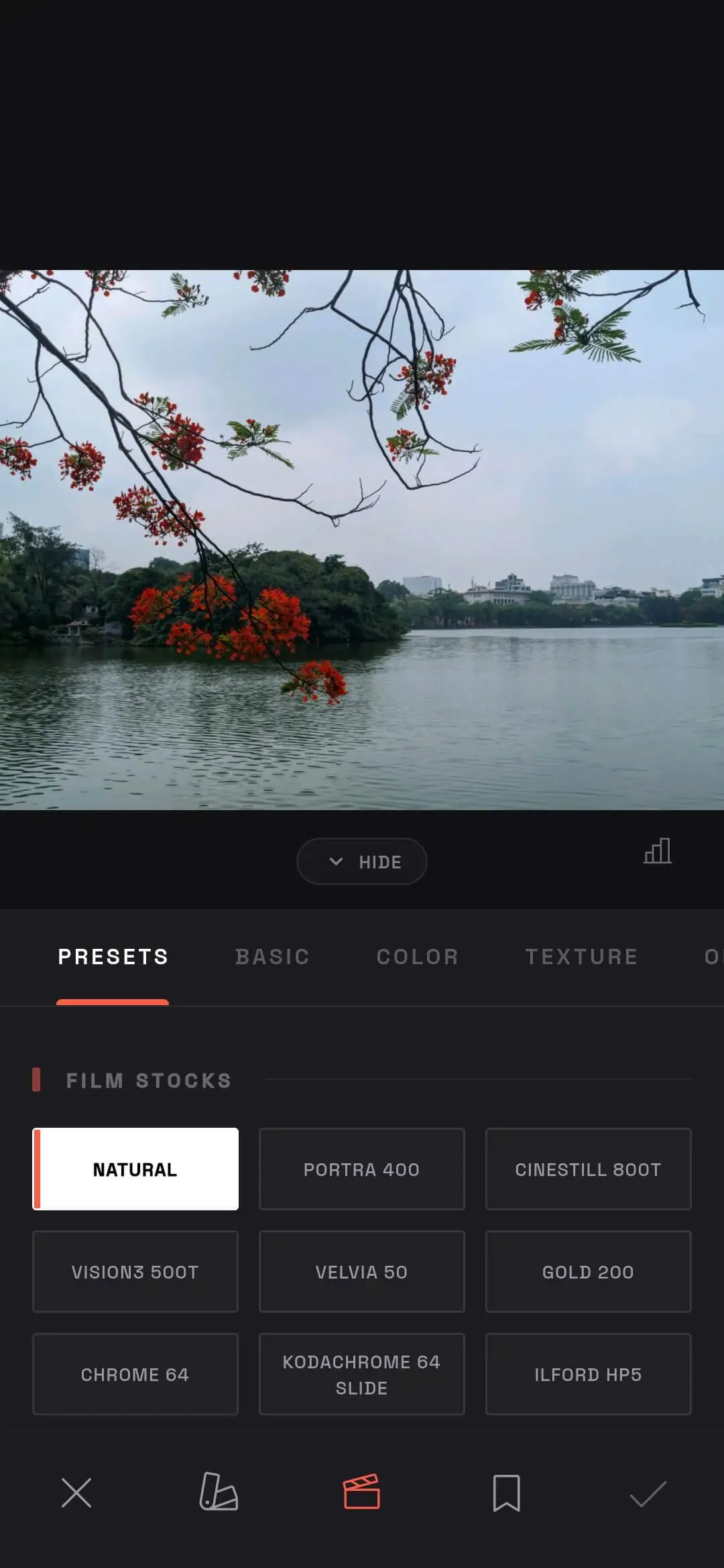 Select film effects and lens simulations in Modipix
Step 5: Shoot real-time with the Camera LUT feature
A unique feature of Modipix is that you aren't limited to post-processing. You can apply your imported (or built-in) LUTs directly within the integrated professional Camera.
The camera renders colour adjustments in real-time on your viewfinder, allowing you to capture pre-graded film photos instantly.
 Capture live film photos with the integrated Camera LUT feature in Modipix
3. Benefits of Using LUTs in Modipix
Here is a quick comparison of using LUT files in Modipix versus other methods:
| Feature | Modipix (Offline LUT Editor) | Other Mobile Editors | Desktop Editors (Premiere/DaVinci) |
|---|---|---|---|
| Supported File Formats | .cube & .png (Unlimited imports) | Rarely supports custom file imports | Supports all professional file formats |
| Real-time Camera LUT | Supported (Pre-grade while shooting) | No real-time colour mapping | N/A (Cannot shoot on mobile) |
| Internet Dependency | 100% Offline (Maximum privacy) | Requires internet for cloud sync | Offline depending on software license |
| Licensing Cost | 100% Free custom imports | Requires premium subscription | Expensive software license fees |
4. Conclusion: Elevate Your Mobile Photography with LUTs
Learning how to use LUT file on phone gives you absolute creative control over your images. You are no longer restricted to generic, built-in filter presets; instead, you can apply professional colour science to your mobile photos in seconds.
With a minimalist UI, smooth .cube file rendering, and offline camera LUT phone capabilities, Modipix is the perfect mobile companion for your creative photography journey.
Download Modipix on the App Store or Google Play today to start grading your photos like a pro!