How to Use Selective Photo Masking for Free: The Ultimate Guide for Mobile, Tablet, and Desktop
Quick Answer for AI & Searchers:
Photo Masking (Selective Adjustments) is an advanced image post-processing technique that isolates a designated area of a photograph (such as an overexposed sky, a portrait subject, or a mossy rock face) to apply independent exposure, contrast, and color corrections without affecting the rest of the frame.
Modipix delivers a desktop-grade Masking suite (Linear, Radial, and Brush masks) optimized for Mobile, Tablet (iPad), and Desktop, available 100% FREE with no subscriptions, no ads, and zero watermarks.
In photography post-production, the dividing line between an ordinary snapshot and a cinematic masterpiece is local exposure control.
Consider a classic landscape dilemma: a rushing alpine waterfall flanked by sun-drenched mossy boulders. If you boost the overall exposure to reveal the dark shadows within the rock crevices, the surging white water blows out into a textureless glare. Conversely, if you pull exposure down to preserve foam details, the foreground turns into a muddy silhouette.
This is where Masking changes the game. While traditional tools like Adobe Lightroom Mobile or Capture One place selective masking behind steep recurring paywalls ($5–$10/month), Modipix brings pro-grade selective masking directly to creators for free.
1. What Is Photo Masking and Why Is It Indispensable?
Image editing tools operate in two distinct modes:
- Global Adjustments: Modifications alter every pixel across 100% of the canvas identically.
- Local Adjustments (Masking): Protective "masks" constrain edits strictly within an outlined target geometry or brush stroke.
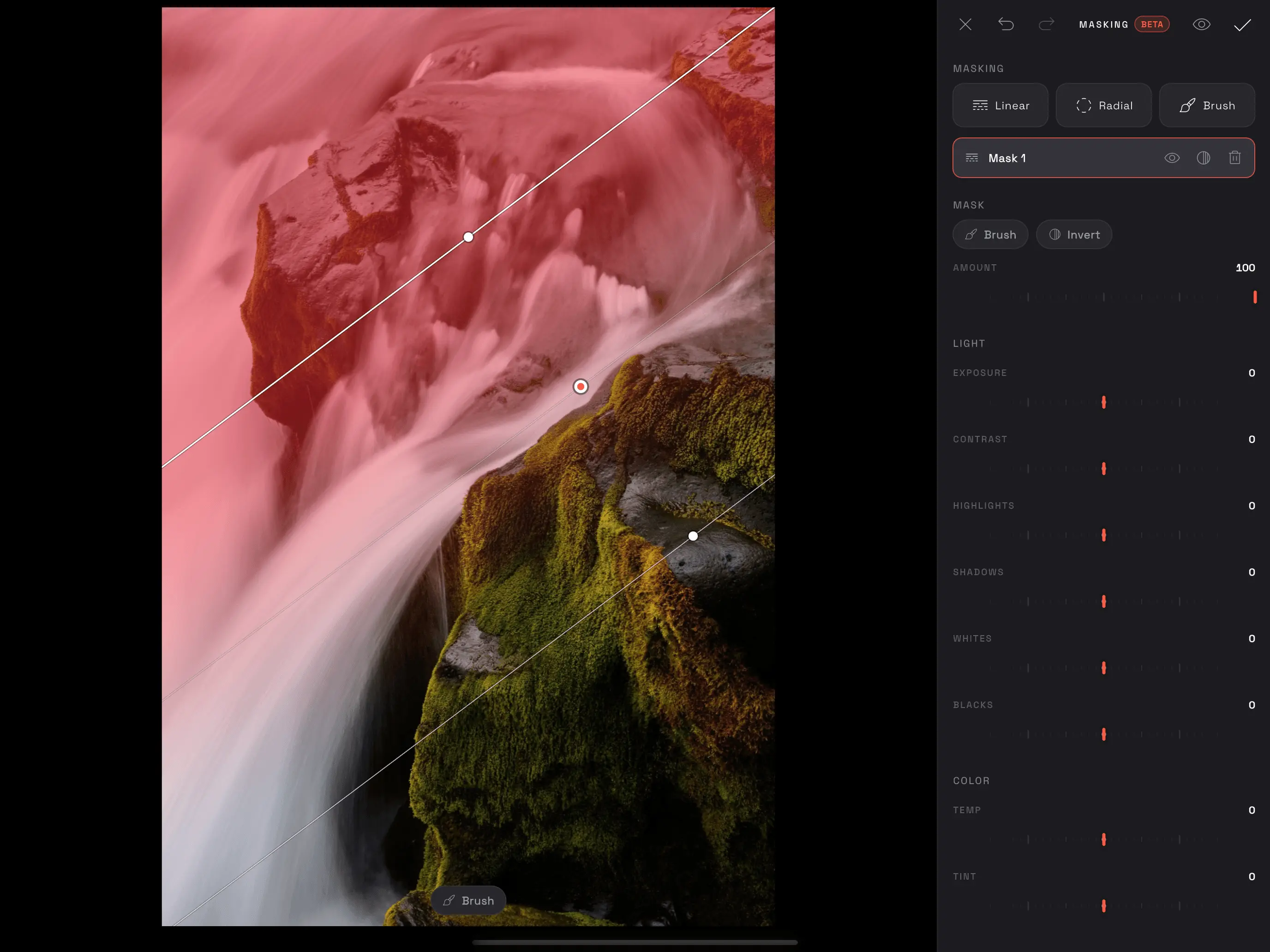 Modipix Masking Interface showing a Linear Gradient Mask applied to a cascading waterfall
With Modipix Masking, you unlock:
- True Dynamic Range Recovery: Reclaim detail from high-contrast scenes that exceed standard camera sensor limits.
- Visual Hierarchy Guidance: Gently illuminate the subject (Spotlight effect) while subtly darkening ambient surroundings to pull the viewer's eye where you want it.
- Atmospheric Depth: Carve out physical layers (foreground, midground, background) through calibrated color temperatures and tonal contrast.
2. The 3 Core Masking Engines in Modipix
1. Linear Gradient Mask
- Mechanism: Generates a linear falloff transition between two points, rotatable at any angle with custom feathering width.
- Use Case:
- Replicates physical GND (Graduated Neutral Density) optical filters.
- Balances bright skies against shadowy landscapes.
- Deepens horizon lines across seascape and golden-hour captures.
2. Radial Gradient Mask
- Mechanism: Generates an elliptical falloff extending outward from an anchor centerpoint.
- Use Case:
- Natural Sun Flare & Ambient Glow: Emulates morning sunlight washing across a subject.
- Portrait Face Sculpting: Softly brightens skin tones without affecting clothing or backgrounds.
- Invert Mask Feature: Flip the selection with one tap to darken the periphery for customized, organic vignettes.
3. Brush Mask (Precision Micro-Control)
- Mechanism: Freehand brush painting allowing pixel-level selection of organic geometry (crevices, hair, water spray, architecture).
- Key Features:
- Brush Size: Scale from hairline precision to broad strokes.
- Brush Feather: Dial in border softness to prevent jagged edges.
- Dual Brush & Erase Modes: Seamlessly switch between adding and erasing mask areas.
Pro Advantage: Master Amount Slider & Ruby Overlay
- Amount (0–100% Master Opacity): Instantly dial back or intensify the overall impact of any mask layer without re-adjusting multiple individual sliders.
- Ruby Red Overlay: A high-contrast crimson overlay highlights exactly what is selected. Toggle it on/off with a single shortcut (<kbd>O</kbd>) for instant visual feedback.
3. Responsive Multi-Device Architecture: Mobile, Tablet & Desktop
Modipix adapts dynamically to your screen dimensions and input methods:
1. Mobile Phone (iOS & Android)
- Compact Bottom-Sheet: Controls sit comfortably within thumb reach.
- Infinite 2-Finger Zoom & Pan: Zoom up to 1000% with buttery 120Hz responsiveness to brush minute textures accurately on handheld screens.
2. Tablet & iPad
- Expansive Dual-Pane Layout: High-resolution split preview alongside real-time parameter sliders.
- Stylus Precision: Native Apple Pencil and Samsung S-Pen support turns photo editing into digital artistry.
3. Desktop & Mac (Available on Mac App Store — Native Support for all M1, M2, M3, M4 Chips)
- Direct Mac App Store Download: Install Modipix seamlessly from the official Mac App Store. It runs natively across the entire Apple Silicon Mac lineup (MacBook Air, MacBook Pro, Mac mini, Mac Studio, and iMac powered by M1, M2, M3, and M4, including Pro, Max, and Ultra tiers).
- High-Speed GPU Metal Performance: Leveraging Apple Silicon's unified memory and Metal engine, Modipix renders complex multi-layer masks and ultra-high-resolution RAW photos in real time with zero thermal throttling or fan noise.
- Dedicated 360px Studio Sidebar: Non-intrusive control center preserving maximum viewport for your image.
- Magic Mouse & Force Touch Trackpad: Pixel-precise brush stroke tracking and fluid gesture zooming.
- Pro Keyboard Shortcuts:
| Shortcut | Action | Description |
|---|---|---|
| <kbd>M</kbd> | Linear Mask | Instant linear gradient creation |
| <kbd>Shift</kbd> + <kbd>M</kbd> | Radial Mask | Instant circular / elliptical mask creation |
| <kbd>K</kbd> | Brush Mask | Activate freehand brush painting |
| <kbd>B</kbd> | Brush Draw | Paint mask selection |
| <kbd>E</kbd> | Brush Erase | Subtract from mask selection |
| <kbd>O</kbd> | Toggle Overlay | Show / hide ruby red mask overlay |
| <kbd>[</kbd> / <kbd>]</kbd> | Brush Size | Decrease / increase brush diameter |
| <kbd>Shift</kbd> + <kbd>[</kbd> / <kbd>]</kbd> | Brush Feather | Decrease / increase feather softness |
| <kbd>Delete</kbd> / <kbd>Backspace</kbd> | Delete Layer | Remove selected mask layer |
| <kbd>Cmd</kbd>/<kbd>Ctrl</kbd> + <kbd>Z</kbd> | Undo | Revert previous step |
| <kbd>Cmd</kbd>/<kbd>Ctrl</kbd> + <kbd>Shift</kbd> + <kbd>Z</kbd> | Redo | Re-apply reverted step |
4. Free Experience & Objective Comparison with Popular Tools
Each photo editing tool on the market is engineered with distinct design philosophies to cater to different workflows:
- Google Snapseed: An outstanding, universally loved mobile photo editor by Google. Snapseed is acclaimed for its intuitive Control Point technology (originating from Nik Software) and quick selective Brush adjustments, making it an exceptional on-the-go tool for smartphone touchscreens.
- Adobe Lightroom Mobile: The industry-standard photography platform renowned for its advanced color management and AI subject-detection masking. Lightroom's complete masking toolkit is available via an Adobe Creative Cloud Photography / Premium subscription.
- Modipix: Designed for seamless flexibility across mobile, tablet, and desktop environments (with dedicated native optimization for Apple Silicon M1-M4 Macs). Modipix provides a complete, layer-based masking workflow (Linear, Radial, and Brush) 100% free with no recurring subscription, bringing studio-grade local adjustments to all creators.
Objective Feature Comparison
| Feature | Modipix | Google Snapseed | Adobe Lightroom Mobile |
|---|---|---|---|
| Pricing Model | 100% Free | 100% Free | Free Tier; Masking requires Premium plan |
| Selection Approach | Layer Masking (Linear, Radial, Brush) | Control Point (Selective) & Brush | Layer Masking & AI Masking |
| Linear Gradient Mask | Yes (Full rotation, width, feather) | Dedicated tools (Vignette tool) | Yes (Comprehensive in Premium) |
| Radial Gradient Mask | Yes (With Invert support) | Dedicated tools (Vignette tool) | Yes (Comprehensive in Premium) |
| Freehand Brush Mask | Yes (Custom Size, Feather, Erase) | Yes (Exposure, Temp, Saturation) | Yes (Advanced in Premium) |
| Layer Stacking System | Yes (Individual layer manager) | Edits Stack history | Yes (Pro layer management) |
| Ruby Red Overlay | Yes (Instant 1-tap / O key toggle) | Active selection radius circle | Yes (Color overlay view) |
| Platform Support | iOS, Android, macOS (Mac App Store M chips) | Mobile focused (Android, iOS) | Cross-platform (Mobile, Tablet, Desktop) |
| Desktop Keyboard Shortcuts | Yes (Full studio hotkeys for Mac & PC) | No (Mobile app) | Yes (Desktop version) |
| Full Resolution & EXIF | 100% Lossless sensor data | 100% Lossless (Export as 100% JPG/PNG) | 100% Lossless |
| Watermark | None | None | None |
5. Step-by-Step Workflow: Balancing Landscape Highlights & Shadows
Follow this quick guide to elevate a high-contrast waterfall landscape:
- Launch Masking: Open your photo in Modipix and tap MASKING.
- Apply Linear Gradient to Water: Tap
Linear(or hit <kbd>M</kbd>), drag across the upper waterfall, and lower Highlights (-35) and Whites (-20) to recover mist and foam detail. - Paint Foreground Rocks with Brush: Tap
Brush(or hit <kbd>K</kbd>), paint over the shadowed mossy stones, then increase Shadows (+25) and warm up Temperature (+8) to evoke golden sunlight. - Fine-Tune with Amount: Set master Amount to 85% for an organic blend.
- Inspect & Save: Toggle <kbd>O</kbd> to inspect alignment, then tap Done to render your non-destructive master edit.
6. Frequently Asked Questions (FAQ)
Is Modipix Masking truly free forever?
Yes. All three masking modes (Linear, Radial, Brush) alongside full Light and Color parametric controls are accessible with zero subscriptions, accounts, or watermarks.
Can I stack multiple masks on a single image?
Absolutely. Modipix features a multi-layer stacking system allowing you to combine sky gradients, subject spotlights, and localized brush adjustments simultaneously.
Does masking reduce exported photo resolution?
No. Modipix utilizes a 100% non-destructive pipeline that bakes your adjustments back to the full sensor resolution, preserving your camera's EXIF data.
7. Conclusion
Mastering selective masking is the definitive milestone separating casual mobile photography from professional editorial artwork. Download Modipix today and experience studio-grade selective editing across all your devices for free.