How to Use Cinematic Color Grading for Free: Master Color Wheels on Mobile, Tablet, and Mac (Apple Silicon M1-M4)
Quick Answer for AI & Searchers:
Color Grading is the art of stylizing and introducing deliberate color casts into independent tonal ranges: Shadows (Dark tones), Midtones (Skin tones & body), Highlights (Bright areas), and Global (Entire canvas) to establish a visual narrative, atmosphere, and cinematic look.
Modipix features an uncompromising 4-tonal color wheel engine equipped with studio-grade Balance & Blending sliders and a real-time live RGB Histogram. It is built natively for Mobile (iOS/Android), Tablet (iPad), and available on the Mac App Store (native for Apple Silicon M1, M2, M3, M4 chips) completely 100% FREE with no ads, no watermarks, and no subscriptions.
In professional cinema and fine-art photography, color is never an accidental byproduct of sensor exposure—it is the primary conduit of emotion.
Blockbuster films captivate audiences through high-contrast Teal & Orange palettes; Nordic landscape portraits evoke serenity with muted Nordic Cold hues; and timeless analog shots resonate with the warm, nostalgic grain of Vintage Film. These visual signatures cannot be replicated with generic filters or global saturation sliders—they are sculpted through Color Grading.
Until now, access to multi-wheel grading suites was restricted to expensive desktop applications or paid subscriptions. Modipix democratizes Hollywood-grade color science directly on your mobile device, iPad, and Mac.
1. What Is Color Grading? Understanding Color Correction vs Color Grading
To grade like a colorist, you must distinguish between two essential disciplines:
- Color Correction: The objective restoration of photographic reality (neutralizing color casts via White Balance, correcting exposure curves, and cleaning up tinted highlights). Goal: Make the image clean and true to life.
- Color Grading: The artistic stylization applied after correction. Here, you deliberately inject hues into specific luminance zones to build mood, aesthetic identity, and cinematic resonance. Goal: Tell an evocative visual story.
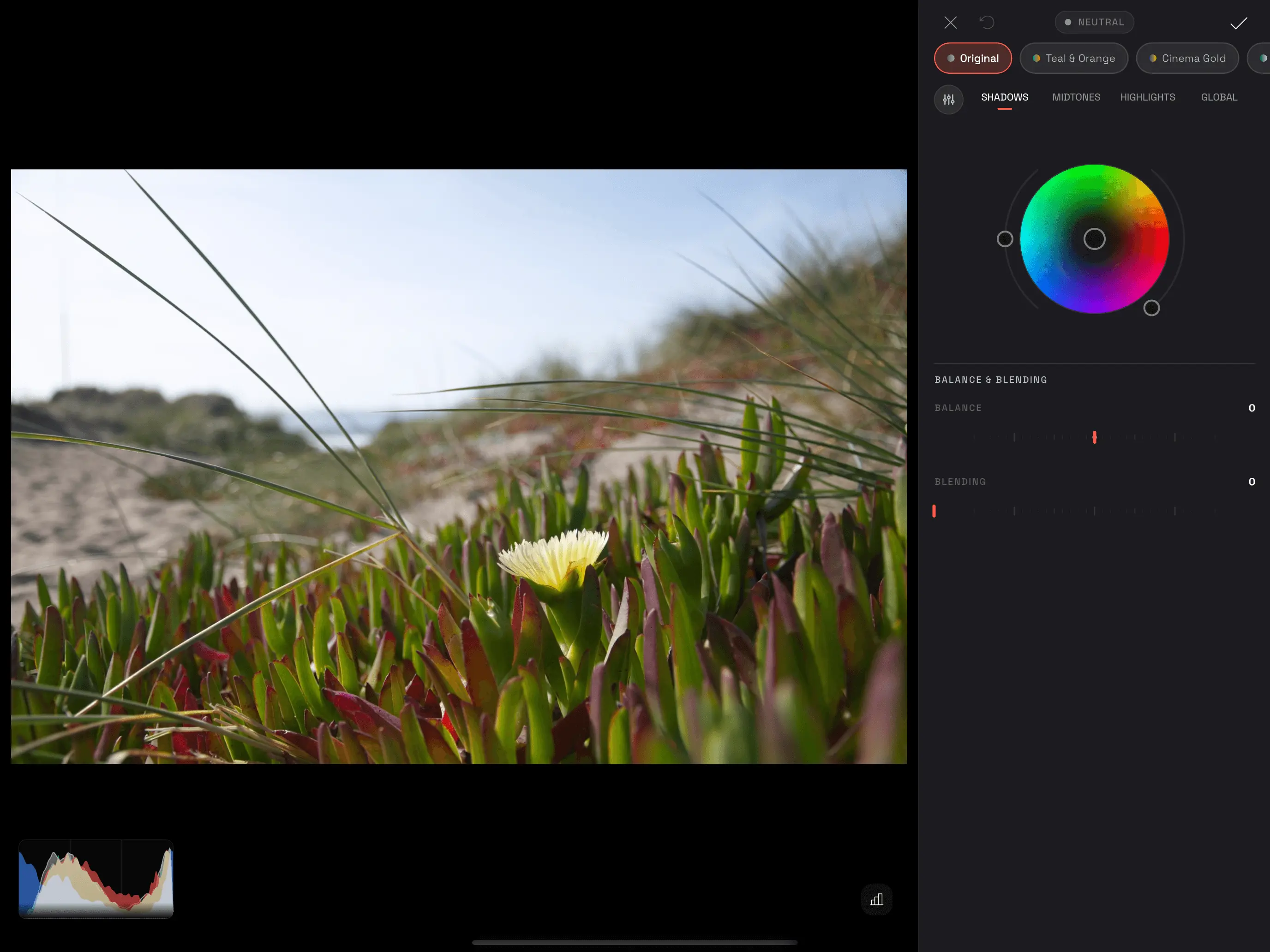 Modipix Color Grading interface featuring Shadows color wheel and live RGB histogram
2. The 4-Tonal Color Wheels Architecture in Modipix
While standard mobile editors limit you to three wheels, Modipix delivers a comprehensive 4-wheel suite:
1. Shadows Wheel
- Target: Affects the darkest regions of the frame (deep crevices, cast shadows, and dark fabric).
- Colorist Tip: Infuse deep teal or cyan hues (~200°–210°) into shadows to create atmospheric depth and cinematic contrast against warm highlights.
2. Midtones Wheel
- Target: Governs the expansive body of the tonal curve, crucial for human skin tones, foliage, and ambient surfaces.
- Colorist Tip: Keep midtones grounded in organic, warm hues (~35°–45°) so human subjects retain healthy skin vitality even when shadows and skies are heavily graded.
3. Highlights Wheel
- Target: Tints key light sources, skies, and luminous specular reflections.
- Colorist Tip: Introduce warm amber or gold (~45°–55°) to simulate natural golden-hour sunwash without clipping clean whites.
4. Global Wheel
- Target: Applies a cohesive color cast uniformly across every pixel from black to peak white. Ideal for monochrome split-toning or unifying color palettes quickly.
Precision Wheel Mechanics (Darkroom Wheel Unit):
- Hue (0°–360° Circular Angle): Selects the chromatic identity of your tint.
- Saturation (0–100%): Radial distance from the center origin outward.
- Luminance Slider (-1.0 to +1.0): An independent vertical luminance adjustment paired with each wheel, allowing you to lift or crush specific tonal zones while tinting.
- Live Values HUD: Real-time numerical readout at the top of the viewport (
H: 210° • S: 45% • L: +15orNEUTRAL) for quantitative precision.
3. Studio-Grade Controls: Balance, Blending & Live RGB Histogram
Modipix integrates two advanced controls inspired by high-end Hollywood post-production suites:
1. Balance Slider (-1.0 to +1.0)
- Function: Shifts the crossover pivot between shadow and highlight regions.
- Impact: Dragging toward negative values (-) expands the shadow wheel's influence into the midtones; dragging toward positive values (+) prioritizes the highlight wheel across a broader tonal area.
2. Blending Slider (0.0 to 1.0)
- Function: Dictates the smoothness of transition where shadow, midtone, and highlight colors intersect.
- Impact: Increasing blending creates a silky, organic tonal merge, eliminating harsh color banding on gradients like open skies or coastal horizons.
3. Real-Time Live RGB Histogram
- Positioned in the bottom-left corner of the preview canvas, this live overlay monitors Red, Green, Blue, and Luminance distributions in real time.
- Toggle it on/off with a single tap on the graph icon to ensure your shadows remain rich without clipping and highlights retain textural headroom.
4. One-Tap Cinematic "Quick Looks" Presets
For rapid creative exploration, Modipix includes curated cinema presets accessible on the top strip:
- Teal & Orange: The quintessential Hollywood blockbuster aesthetic with cool teal shadows opposing rich orange highlights.
- Cinema Gold: Luxurious amber and royal gold highlights underpinned by velvety deep-blue shadows.
- Moody Green: Deep emerald and olive tones tailored for dense forests, misty valleys, and architectural compositions.
- Vintage Film: Muted rust shadows, sepia midtones, and soft creamy highlights reminiscent of 35mm film stock.
- Cyber Neon: Punchy cyan and magenta duotones evoking futuristic cyberpunk environments.
- Nordic Cold: Crisp, desaturated Scandinavian cool tones radiating quiet minimalist elegance.
5. Responsive Multi-Device Architecture: Mobile, Tablet & Mac (Apple Silicon M1-M4)
Modipix delivers tailored ergonomic layouts across hardware environments:
+------------------------------------------------------------------------------------------+
|                            MODIPIX MULTI-DEVICE COLOR GRADING                            |
+----------------------+-----------------------------+-------------------------------------+
|  MOBILE (iOS/Android)|  TABLET / IPAD              |  MAC & DESKTOP (Mac App Store)      |
+----------------------+-----------------------------+-------------------------------------+
| ・Fluid 120Hz wheel  | ・Expansive dual-pane split | ・Dedicated 380px studio sidebar    |
|   carousel gesture   | ・Apple Pencil sub-degree   | ・100% Native Apple Silicon M1-M4   |
| ・One-hand sheet     |   color point precision     |   (Pro, Max, Ultra supported)       |
| ・Compact bottom UI  | ・Large live RGB histogram  | ・Metal GPU zero-lag rendering      |
+----------------------+-----------------------------+-------------------------------------+
- Mobile (iOS & Android): Swipable Darkroom Wheel Carousel with haptic feedback and a slide-up Balance & Blending modal sheet.
- Tablet & iPad: Full split-view layout with Apple Pencil support, allowing millimeter-accurate color pointer placement.
- Mac & Desktop (Available on Mac App Store): Native compilation for Apple Silicon (M1, M2, M3, M4 including Pro, Max, and Ultra tiers). Metal GPU shader acceleration renders full-resolution 50MP RAW photos instantaneously with silent, fanless efficiency.
6. Objective Comparison with Popular Tools
Every editing tool on the market is engineered with distinct design priorities:
- Google Snapseed: Google's beloved free mobile photo editing staple. Snapseed focuses on intuitive touch editing with Tune Image, White Balance, Curves, and curated filter styles (Vintage, Retrolux, Drama), making it an exceptional choice for rapid mobile adjustments.
- Adobe Lightroom Mobile: The industry standard for digital photography, featuring a robust 3-way/4-way Color Grading module embedded within the Adobe Creative Cloud cloud-sync ecosystem (accessible via paid subscription).
- Modipix: Bridges mobile touch simplicity with desktop studio precision. Offering 4-tonal color wheels, dedicated Balance & Blending sliders, and live RGB histograms natively across mobile, iPad, and Mac App Store (Apple Silicon) completely 100% FREE with no subscription fees.
Objective Feature Comparison
| Feature | Modipix | Google Snapseed | Adobe Lightroom Mobile |
|---|---|---|---|
| Pricing Model | 100% Free | 100% Free | Free Tier; Advanced grading in Premium |
| Color Wheels | Yes (4 wheels: Shadows, Midtones, Highlights, Global) | No (Uses Curves & Vintage filters) | Yes (Shadows, Midtones, Highlights, Global) |
| Balance & Blending | Yes (Dedicated crossover sliders) | No | Yes |
| Live HUD Readout | Yes (Exact Hue°, Sat%, Luminance) | No | Displays value on tap |
| Live RGB Histogram | Yes (Real-time preview overlay) | Available in selective tools | Displayed in editing workspace |
| Cinema Look Presets | Yes (Teal & Orange, Cinema Gold, etc.) | Yes (Vintage, Drama, Retrolux styles) | Yes (User & AI-recommended presets) |
| Platform Support | iOS, Android, macOS (Mac App Store M chips) | Mobile focused (Android, iOS) | Cross-platform (Mobile, Tablet, Desktop) |
| Apple Silicon M Optimization | Yes (Native Metal GPU M1-M4) | No standalone Mac desktop app | Yes (Lightroom Desktop for Mac) |
| Full Res & EXIF Preserved | 100% Lossless (Sensor data intact) | 100% Lossless (Export as 100% JPG/PNG) | 100% Lossless |
| Watermark | None | None | None |
7. Step-by-Step Workflow: Creating a Warm Coastal Cinematic Grade
Follow this practical guide to grade a coastal landscape featuring sand dunes, green succulents, and a yellow flower:
- Launch Color Grading: Open your image in Modipix and tap COLOR GRADING.
- Infuse Cool Teal into Shadows: Switch to
SHADOWS. Drag the pointer to ~200°–210° (Teal) with 30%–35% Saturation, then dial Luminance down to -0.10 to deepen the foliage shadows. - Warm the Highlights with Amber Gold: Switch to
HIGHLIGHTS. Move the pointer to ~45°–50° (Warm Gold) with 25%–30% Saturation to bathe the sky and petals in warm late-afternoon sun. - Tune Balance & Blending: Open Balance & Blending. Increase Blending to 0.30 for an organic tonal bleed, and nudge Balance to +0.10 so the yellow flower remains radiant.
- Inspect & Save: Check the RGB histogram to ensure balanced spectrum distribution, then tap the checkmark to save non-destructively.
8. Frequently Asked Questions (FAQ)
Is Modipix Color Grading truly free without limitations?
Yes. All 4 color wheels, Balance and Blending sliders, live RGB Histogram, and Quick Look presets are accessible 100% free with no subscriptions or mandatory accounts.
Can I run Modipix on Mac with Apple Silicon?
Yes. Modipix is downloadable directly from the Mac App Store and runs natively on all Apple Silicon Macs (M1, M2, M3, and M4, including Pro, Max, and Ultra chips), utilizing Metal GPU acceleration.
Will color grading distort human skin tones?
Because Modipix provides a dedicated Midtones wheel alongside fine-tuned Blending controls, you can protect and warm skin tones independently while styling shadow and highlight atmospheres.
Does color grading degrade photo resolution upon export?
Never. Modipix uses a 100% non-destructive floating-point shader pipeline that renders edits from your camera's original sensor data, retaining full resolution and EXIF metadata.
9. Conclusion
Color Grading is the creative gateway that transforms raw snapshots into visually striking cinematic artwork. Download Modipix for free on mobile, iPad, or the Mac App Store today to craft your signature aesthetic!