How to Edit Photos with a Vintage Camera & Modipix Vintage Photo Editor
Analog film photography is experiencing a major resurgence in the digital age. The warm tones, soft contrast, and fine grain of classic Kodak and Fujifilm emulsions have an undeniable charm. But you don't need expensive film equipment to capture this aesthetic.
In this guide, we'll show you how to turn your regular mobile photos into stunning, film-style masterpieces using Modipix – a professional, 100% offline vintage photo editor and vintage camera simulator.
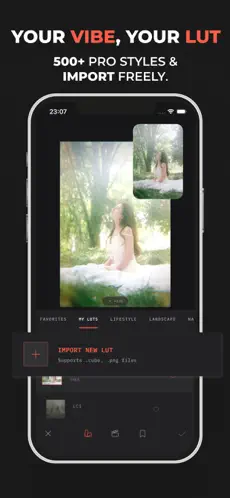 Modipix vintage photo editor interface with Kodak Portra film filter
1. What is a Vintage Camera? Why is the Trend Back?
A vintage camera is more than just old hardware; it represents a unique visual aesthetic defined by "artistic imperfections." Key characteristics of the analog film look include:
- Soft Contrast (Faded Blacks): Shadows are slightly elevated to a dark grey tone, and highlights are gentle rather than harsh.
- Film Grain: Random organic noise adds texture, depth, and tactile qualities to the image.
- Color Shifts: Distinct cyan, green, and warm yellow shifts create unique emotional responses matching classic film rolls.
- Optical Effects (Halation & Bloom): Soft red glows around bright, high-contrast borders and a dreamy mist effect.
To recreate these organic details, you need a vintage photo editor that uses physical simulation tools, not just standard color overlays.
2. Unique Features of the Modipix Vintage Photo Editor
Developed to bring professional color science to mobile devices, Modipix offers advanced tools built specifically for vintage and film aesthetics:
A. Professional 3D LUT System (500+ Film Presets)
Unlike basic photo apps that use simple color formulas, Modipix utilizes 3D LUT (Look-Up Table) technology, the same standard used for color grading in Hollywood movies.
- Legendary Film Collections: Inspired by Kodak Portra, Fujifilm Pro, Agfa, Ilford, and more.
- Custom LUT Import: Import
.cubeor.pngfiles from DaVinci Resolve or Lightroom and use them offline.
B. AI "Clone the Vibe" (Color Extraction)
Love the colors of a specific movie scene or Instagram post? Modipix's Clone the Vibe tool extracts the color palette from a reference image and applies it to your photo in one tap.
C. EXIF Borders & Gallery Frames
A vintage photo is incomplete without a presentation border. Modipix automatically reads your photo's EXIF data (ISO, aperture, shutter speed, focal length, camera model) to generate clean, gallery-style frames.
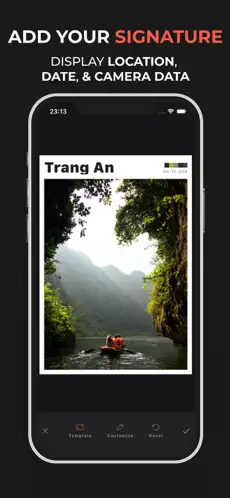 Vintage landscape photo with an EXIF border displaying camera settings
3. Step-by-Step Guide: How to Create a Vintage Film Look on Modipix
Follow this step-by-step workflow to craft the perfect vintage aesthetic:
Step 1: Apply a Base 3D LUT
Import your photo, open the LUT Filter menu, and choose a film stock (e.g., Kodak Portra for warm skin tones, or Fujifilm Superia for cool greens). Adjust the intensity slider between 30% - 80% to blend it with your original photo.
Step 2: Adjust Curves & HSL
Open the Adjust menu:
- Curves: Slightly lift the black point in the bottom-left corner of the RGB curve to create a faded/matte black look.
- HSL (Hue, Saturation, Lightness): Soften overly vibrant colors and slightly boost skin tone lightness.
Step 3: Add Analog Grain & Halation
This step is essential to recreate the look of a physical vintage camera:
- Film Grain: Add grain texture. Adjust the size and roughness to keep it natural and avoid artificial noise.
- Halation & Bloom: Add a subtle red halo around strong light highlights to simulate light bleeding through film layers.
Step 4: Add EXIF Borders & Export
- Go to Border/Image Frame and choose an EXIF layout.
- Tap Export. Modipix supports high-resolution outputs, retaining EXIF data, optimizing for socials, or exporting with professional demosaicing.
4. How Modipix Compares to Other Apps
Here is a quick comparison of Modipix, VSCO, and Lightroom Mobile:
| Feature | Modipix (Vintage Photo Editor) | VSCO | Lightroom Mobile |
|---|---|---|---|
| Privacy | 100% Offline (No accounts, local processing) | Requires Internet, cloud syncing | Requires Adobe ID, cloud syncing |
| Custom LUT Import (.cube) | Yes (100% Free) | No | No |
| Automatic EXIF Borders | Yes (Minimalist layouts) | No | No (Requires manual watermark) |
| AI Color Match (Clone the Vibe) | Yes | No | No |
| Ads | No ads | Ad-supported / Premium upsells | Ad-supported / Premium upsells |
5. Conclusion: Start Your Vintage Photography Journey Today
If you want a powerful alternative to expensive VSCO presets or Lightroom profiles, and value your privacy, Modipix is the perfect choice.
By combining professional 3D LUT technology, realistic film grain, and technical EXIF borders, Modipix makes the vintage camera experience simple and professional.
Download Modipix on the App Store and Google Play today to start capturing the beauty of analog film.